ATM Driving Audit Log
The audit log tracks all activity within the ATM Driving application for the past three months.
The audit log is display only.
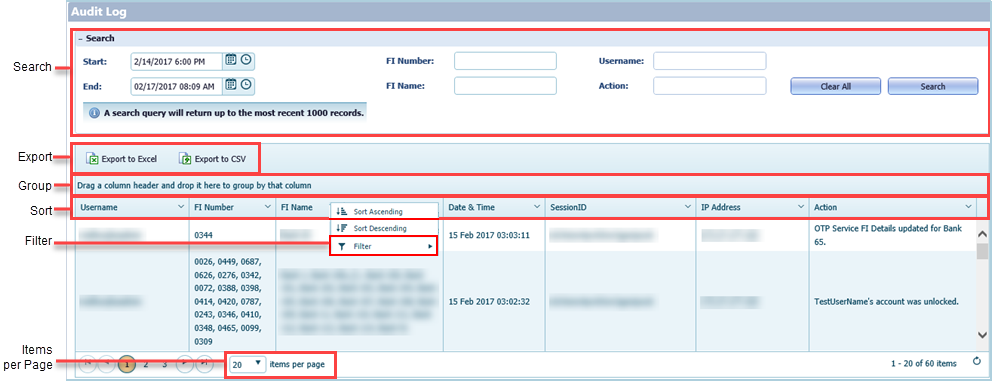
- Search
-
You can search using these fields.
-
Start and End search over a time range. If you only select a date, the time
defaults to 12:00
AM. If you only select a time, the date defaults to the current
day.Tip You cannot select a date or time in the future when searching for the following:
- Event Notification
- Transaction History
- Electronic Journal
- Processed Commands
- FI Number requires an exact match.
- FI Name returns results for partial matches.
- Username requires an exact match.
- Action returns results for partial matches. This field does not provide search suggestions.
-
Start and End search over a time range. If you only select a date, the time
defaults to 12:00
AM. If you only select a time, the date defaults to the current
day.
- Export
- You can export the list to Excel® or CSV® format.
- Group
- You can group the list by dragging one or more columns to the grouping area at the top of the grid.
- Sort
- Select the column header to sort by column.
- Filter
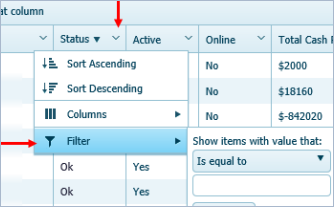
- Click the chevron in the column header to open the Filter function. You can
create a filter to return more specific results. Filter options vary depending on the
column and the page.
- Items per Page
- This feature indicates the number of items that appear per page.